See the real arc
Great-circle routes make long distances feel intuitive again, especially across oceans, polar regions, and the date line. The route is no longer an abstract number; it becomes a shape you can read.
 Arclune
Arclune takes the little codes on a ticket, map, or timetable and opens the whole route behind them: the great-circle arc, the real distance, the stopover picture, and a calm sense of scale. It is made for the moment when you wonder: how far is that, really?
Free at launch · No account · No tracking
Information & visualization only — not for navigation or flight planning. Details.
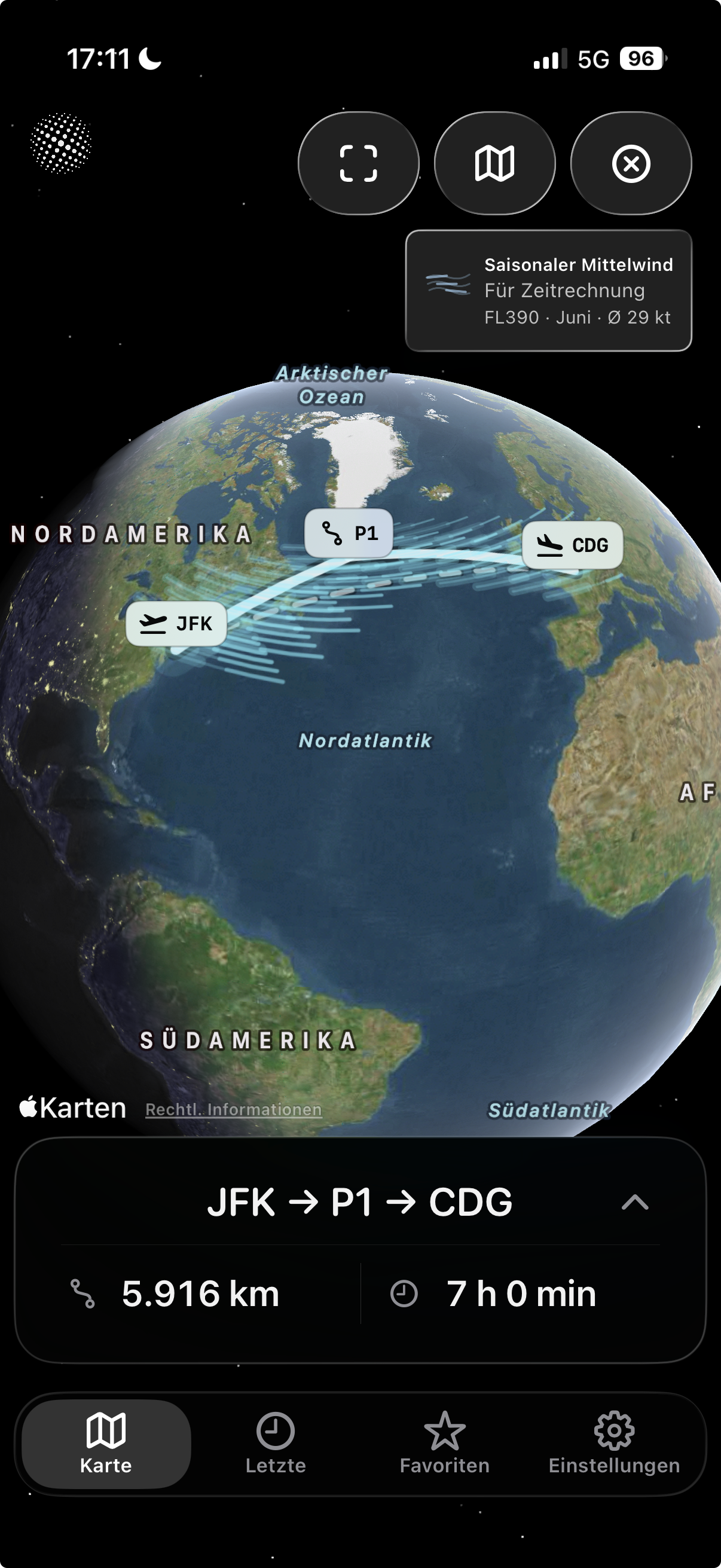
Most maps flatten the world until long routes feel strangely wrong. Arclune restores the geometry: pick two airports, watch the arc curve across the globe, compare the distance, add a stop, and keep the route when it matters to you.
Great-circle routes make long distances feel intuitive again, especially across oceans, polar regions, and the date line. The route is no longer an abstract number; it becomes a shape you can read.
Add stops or manual route points and instantly see how the route changes. Compare direct routes with stopovers, trace a route closer to what you have in mind, and keep the direct reference visible.
When you want more context than distance alone, Arclune can add clearly labeled informational time estimates from aircraft assumptions, route distance, and typical seasonal wind context.
No account. No tracking. No advertising SDK. The airport database is bundled with the app, and location access is optional, used only when you ask to find nearby airports.
Arclune is not a cockpit tool and not a travel agency. It is for people who see an airport code and want the map, the distance, and the story behind it to become clear.
Look up the airports you are flying between and understand the route before you pack. See why the line bends, how long the great-circle distance is, and what a stop does to the journey.
Explore routes like JFK -> HND, LHR -> SIN, or SFO -> SYD. Search by IATA, ICAO, FAA/local code, city, or airport name, then let the map answer the question visually.
Compare direct routes, stopovers, and shaped routes without turning the experience into a planning workflow. Arclune keeps the focus on distance, map geometry, and route-scale context.
Export a clean route card with the map, route code, and distance values. It is built to look good in a message, a post, or a personal travel note.
Great-circle routes can surprise you. Arclune makes the curve visible so the world stops feeling like a flat projection and starts feeling like a globe again.
Open recent routes without starting from zero. Routes you revisit stay local and practical, with no account required.
The product is intentionally narrow: make airport routes understandable, beautiful, and trustworthy. That restraint is the point.
Arclune does not bury the route under forms. The map is the center of the experience: choose airports, see the arc, inspect the distance, then save or share when the route is worth keeping.
Distances are shown in kilometers, nautical miles, and statute miles, with route details available when you need them. You get clarity first, detail second.
Type the code you know, the city you remember, or the airport name you can almost spell. Exact codes stay first, while helpful suggestions catch common mistakes after the best matches.
Arclune is clear about what it is and what it is not. It helps you understand airport routes; it does not pretend to make operational, safety, weather, fuel, legal, or regulatory decisions.
Arclune is designed around repeatable little moments: checking a route, comparing a stop, revisiting a recent route, exporting a card, or satisfying the itch to know where a long-haul route really goes.
Pick an origin and destination. Arclune frames the route, shows the distance, and gives the map enough room to be understood at a glance.
Drop in an intermediate airport, reverse the direction, adjust the route shape, or switch map view. Each action is there to clarify the route, not to overwhelm it.
Recent routes turn Arclune from a one-off calculator into a small route notebook for airports you care about.
Open Arclune when you want the satisfying answer: where is the route, how far is it, what changes with a stop, and what does that distance feel like on a globe? It is calm, visual, private, and built for curiosity. Free at launch.
Please note: Arclune is an information and visualization app only. It helps you understand routes, not plan flights. It does not provide navigation, operational flight planning, dispatch, fuel planning, weather briefing, regulatory guidance, or safety-critical decisions. Always rely on official, certified sources. See the full use restrictions.